
Internet Safety Guide for Students: For Educators, Parents and Communities
A practical guide to keeping students safe online, for parents, teachers and communities: risks, cyberbullying, privacy, phones in class and helpful resources.
Our reviews are independent. When you buy through links on this page we may earn a commission, which never changes our rankings. Read our disclosure.
Internet safety for students means giving young people the knowledge, habits and support to use the internet confidently while avoiding its biggest risks: cyberbullying, scams, inappropriate content, contact with predators, privacy leaks and unhealthy screen habits. Nearly half of US teens (46%) say they are online ‘almost constantly’, according to Pew Research Center, roughly double the share a decade earlier.
Key takeaways
- 46% of US teens say they are online almost constantly, and 46% have experienced at least one form of cyberbullying (Pew Research).
- Teach skills first: privacy, critical thinking and knowing when to ask for help. Filters and apps support good habits; they do not replace them.
- Agree clear rules at home and school, including phone-free times such as meals, lessons and bedtime.
- Make sure every student knows who to tell and how to report problems, and that telling will not get them punished.
- Free resources from Common Sense Education, NetSmartz and StopBullying.gov make teaching online safety easier.
Students now use the internet for almost everything: homework, friendships, entertainment, news and even part-time work. That brings enormous benefits, from access to information to creative outlets and support networks. But it also means children meet adult-sized risks at a young age, often on platforms designed to keep them scrolling.
This guide is for parents, teachers, school leaders and anyone who works with young people. It explains what online safety means today, the latest data, the laws that protect children, practical guidance by age, how to handle phones in the classroom, social media, cyberbullying, privacy, newer risks such as sextortion and AI deepfakes, and the best free resources for schools and families.
Understanding the concept of online safety
Online safety, sometimes called e-safety or digital citizenship, is about more than blocking bad websites. It covers four broad areas, often called the four Cs of online risk:
- Content: seeing harmful material, such as violence, pornography, self-harm content, hate speech or misinformation.
- Contact: being approached by people who want to harm, groom, exploit or scam a child.
- Conduct: a young person’s own behavior, such as sharing too much, bullying others or sending images they later regret.
- Commerce: scams, in-app purchases, gambling-like features in games and data collection by apps and advertisers.
A safe student is not one who never goes online. It is one who can protect their personal information, recognize manipulation and scams, treat others with respect, manage their time and knows what to do when something goes wrong. That is why online safety is best taught as a life skill, starting young and growing with the child.
Why teachers and parents should focus on online safety
- Students are online younger and longer. Many children have their own phone or tablet before age 11, and most teens use several social media apps daily.
- Risks target young people specifically. Groomers, sextortion gangs and scammers deliberately use the platforms where students spend time.
- Digital footprints last. Posts, photos and comments can resurface years later and affect college applications, scholarships and jobs.
- Mental health is affected. In 2023 the US Surgeon General issued an advisory warning that heavy social media use poses risks to young people’s mental health, noting that teens who spend more than three hours a day on social media face double the risk of depression and anxiety symptoms.
- Problems spill into school. Online conflicts often start or continue during the school day, affecting learning and wellbeing.
- Parents and teachers see different parts of the picture. Working together makes it much easier to spot problems early.

Statistics on children’s online lives
Reliable data helps adults understand what students actually experience. Here are key findings from Pew Research Center’s surveys of US teens aged 13 to 17:
| Finding | Share of teens | Source |
|---|---|---|
| Online almost constantly | 46% | Pew Research Center, 2023 |
| Use YouTube | 93% | Pew Research Center, 2023 |
| Use TikTok | 63% | Pew Research Center, 2023 |
| Experienced at least one cyberbullying behavior | 46% | Pew Research Center, 2022 |
| Called offensive names online | 32% | Pew Research Center, 2022 |
| Had false rumors spread about them | 22% | Pew Research Center, 2022 |
| Sent explicit images they did not ask for | 17% | Pew Research Center, 2022 |
| Physically threatened online | 10% | Pew Research Center, 2022 |
Older teen girls are the most likely to experience cyberbullying: 54% of girls aged 15 to 17 reported at least one form. Sources: Teens, Social Media and Technology 2023 and Teens and Cyberbullying 2022.
A closer look at online child safety laws
Several laws set rules for how websites, schools and platforms must treat children. Knowing the basics helps parents ask the right questions and helps schools meet their obligations.
United States
- COPPA (Children’s Online Privacy Protection Act, 1998): requires websites and apps aimed at children under 13, or that knowingly collect their data, to get verifiable parental consent. The FTC updated the COPPA Rule in 2025 to strengthen limits on data use and retention.
- CIPA (Children’s Internet Protection Act, 2000): schools and libraries that receive federal E-rate discounts must use internet filters and adopt an internet safety policy that includes educating students about appropriate online behavior.
- FERPA (Family Educational Rights and Privacy Act): protects the privacy of student education records and gives parents rights over them.
- TAKE IT DOWN Act (2025): makes it a federal crime to publish non-consensual intimate images, including AI-generated deepfakes, and requires platforms to remove them quickly after a valid request.
- State laws: a growing number of states have passed rules on phones in schools, age verification and social media use by minors. Check your state education department for current rules.
Outside the United States
- United Kingdom: the Online Safety Act requires platforms to protect children from harmful content, with children’s safety codes in force since 2025.
- European Union: the Digital Services Act requires large platforms to protect minors and bans targeted advertising to children based on profiling.
- Australia: a minimum age of 16 for social media accounts on major platforms took effect in late 2025.
How to guide children for online safety
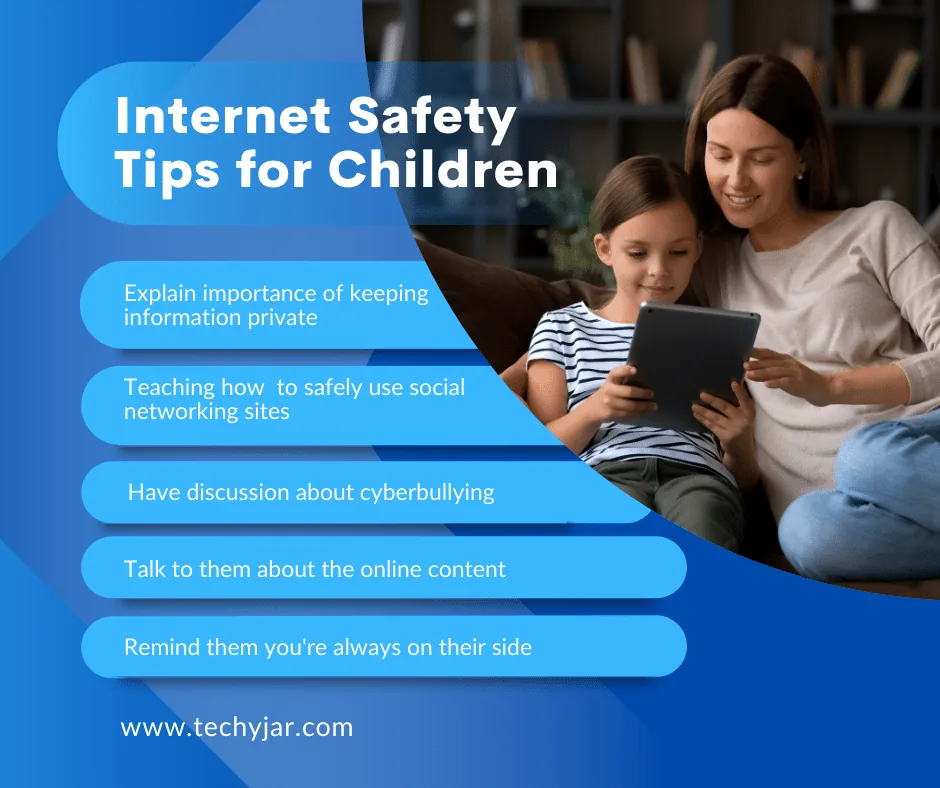
The most effective protection is a child who understands the risks and trusts an adult enough to talk. These principles work at every age:
- Start conversations early and keep them going. Ask what apps and games they use, who they talk to and what they enjoy. Show genuine interest, not just concern.
- Teach privacy basics. Never share full name, address, school, phone number, passwords or live location publicly.
- Build critical thinking. Practice spotting fake accounts, scams, misleading headlines and edited images.
- Set clear, fair rules together, such as where devices are used, when they are switched off and which apps are allowed.
- Use age-appropriate tools such as Apple Screen Time, Google Family Link or parental control apps.
- Model good habits. Children copy what adults do; put your own phone away at meals and bedtime.
- Make it safe to speak up. Promise that reporting a problem will not automatically mean losing their device; fear of punishment is a major reason children stay silent.
Ages 5 to 8
- Use devices in shared family spaces, with an adult nearby.
- Choose child-friendly apps and video services with parental controls such as YouTube Kids.
- Teach a simple rule: if anything online makes you feel worried or confused, tell a grown-up.
- Turn off in-app purchases and chat features.
- Keep screen time predictable and limited.
Ages 9 to 12
- Introduce the idea of personal information and why it stays private.
- Discuss online friends: people are not always who they say they are.
- Agree rules before a first phone, including when and where it is used.
- Remember most social media platforms require users to be at least 13.
- Teach kindness online and what to do if they see bullying.
- Set up filtering, app approvals and screen-time limits.
Ages 13 to 18
- Shift from control to coaching: explain the reasons behind rules.
- Talk openly about relationships, consent, sexting and sextortion.
- Review privacy settings together on every app.
- Discuss digital footprints, college admissions and future employers.
- Encourage healthy habits around sleep, with phones charging outside the bedroom.
- Loosen controls gradually as trust and responsibility grow.
Is your child ready for a first phone?
Instead of focusing on a specific age, consider readiness. A child may be ready when they can:
- Follow agreed rules about when and where to use the phone.
- Look after belongings and keep the phone charged and safe.
- Understand that personal information stays private.
- Tell you when something online worries them.
- Stop using a device when asked without major conflict.
Many families start with a basic phone or a smartwatch that can call and text, then move to a smartphone with controls in place. Whatever you choose, set it up together and agree the rules before the first use.
Conversation starters for parents and teachers
Regular, low-pressure conversations are more effective than a single big talk. Try questions like these:
- What is your favorite app or game right now, and why?
- Who do you usually talk to or play with online?
- Have you ever seen something online that made you uncomfortable? What did you do?
- What would you do if someone you did not know sent you a friend request or message?
- Do you know how to block or report someone on your favorite app?
- Have you or your friends ever been treated unkindly online?
- What do you think is okay to post about yourself, and what is not?
- How do you decide if something you read online is true?
- How do you feel after spending a long time on social media?
- Is there anything about the internet you would like help with?
Exploring the role of smartphones in the classroom
Smartphones can support learning through research, creative projects, accessibility tools and quick quizzes. But they also bring constant notifications, distraction, cheating risks and a channel for bullying during the school day. Many teachers report that phones make it harder for students to focus and to socialize face to face.
As a result, more schools and states have moved to restrict phones, from ‘away for the day’ policies, where phones stay in lockers or pouches, to bans only during lessons. There is no single right approach, but successful policies tend to share some features:
- Clear rules that explain when phones are allowed and why.
- Consistent enforcement across all classrooms.
- Exceptions for medical needs, accessibility and emergencies.
- Communication with parents about how to reach their child during the day.
- Teaching responsible use, not only banning devices, so students learn self-control they can use outside school.
For teachers: when students use devices in class, give a clear task, a time limit and a visible place for devices when the task ends. Short, structured device time reduces distraction far more than open-ended use.
Safe searching and research skills for school
Much of students’ online time is spent on schoolwork. Good research habits keep them safer and make their work better.
- Turn on SafeSearch on school and home devices, especially for younger students.
- Start with trusted sources: school library databases, encyclopedias, government and university sites.
- Use more than one source to confirm facts.
- Be careful with ads that look like search results.
- Avoid downloading files or browser extensions from unfamiliar sites.
- Use AI tools responsibly: check facts against reliable sources, follow school rules on AI use and never paste personal information into a chatbot.
- Cite sources properly and avoid copying; plagiarism checkers are widely used.
Staying safe in remote and hybrid learning
- Use school-approved video platforms with waiting rooms and passwords.
- Never share class meeting links publicly.
- Choose a neutral background, or use a blurred one, to protect home privacy.
- Keep cameras and microphones off when not needed.
- Report any uninvited participants or inappropriate behavior to the teacher straight away.
- Keep school devices updated and use them only for schoolwork.
Student data privacy in school apps
Schools use many apps for learning, communication and homework, and each collects some student data. Parents and teachers can help keep that data safe:
- Ask the school which apps it uses and how student data is protected; FERPA and COPPA set rules for how schools and vendors handle it.
- Look for vendors that have signed the Student Privacy Pledge or have clear privacy policies.
- Teachers should only use approved apps and avoid sharing student names, photos or grades on public platforms.
- Students should use school accounts only for schoolwork and log out on shared devices.
- Report any suspected data breach or suspicious message to the school’s IT team.
Social media awareness
Social media is where most teens spend their online time. It helps them stay connected and express themselves, but it also exposes them to comparison, pressure, harmful content and contact from strangers.
- Check age requirements. Most platforms require users to be at least 13; some countries now set higher limits.
- Set accounts to private and limit who can message, comment or tag.
- Turn off location sharing in apps and posts.
- Understand algorithms. Feeds are designed to keep users watching; talk about taking breaks and noticing how content makes you feel.
- Question what you see. Influencers are often paid, images are often edited and viral claims are often false.
- Think before posting. Anything shared can be screenshotted and spread, even on apps where messages disappear.
- Know how to report and block on each platform.
Social media and wellbeing
Heavy use can affect sleep, mood and self-image, especially for younger teens. Signs of a problem include trouble sleeping, irritability when offline, falling grades, withdrawal from friends and constant comparison with others. If you notice these, talk calmly, agree some limits and, if needed, involve a doctor or school counselor. Our guide to technology and internet addiction has more advice.
Online gaming safety
Gaming is one of the most popular ways students spend time online, and it has real benefits: teamwork, problem solving, creativity and friendship. But multiplayer games also combine chat with strangers, in-game spending and long play sessions, so they deserve the same attention as social media.
Key risks in games
- Chat with strangers: voice and text chat can expose children to bullying, hate speech and grooming.
- In-game purchases and loot boxes: spending can add up quickly, and randomized rewards can feel like gambling.
- Scams: offers of free currency, skins or accounts are a common way to steal logins.
- Time: games are designed with rewards and streaks that make it hard to stop.
How to make gaming safer
- Check the game’s age rating (ESRB in the US, PEGI in Europe) and read parent reviews.
- Use console and platform parental controls to limit chat, purchases and play time.
- Turn off chat with strangers for younger children, or limit it to approved friends.
- Require a password or approval for purchases.
- Play together sometimes; it is the best way to understand what your child enjoys.
- Teach children never to share personal information or move conversations to private apps with people they met in a game.
Screen time, sleep and wellbeing
There is no perfect number of hours of screen time. What matters most is what children are doing, whether it is age-appropriate and whether screens are crowding out sleep, exercise, schoolwork and time with family and friends.
Protect sleep first
Sleep is essential for learning, mood and health, and late-night phone use is one of the biggest threats to it. Notifications, bright screens and the urge to keep scrolling all push bedtimes later. A simple rule works for most families: devices charge outside the bedroom overnight.
Healthy habits to encourage
- Device-free meals and family time.
- No screens in the hour before bed.
- Regular breaks during long sessions, such as the 20-20-20 rule for eyes: every 20 minutes, look at something 20 feet away for 20 seconds.
- Balancing online time with physical activity and outdoor play.
- Noticing how different apps make you feel, and spending more time on the ones that help.
Signs screen use may be a problem
- Trouble falling asleep or waking up.
- Irritability or anger when asked to stop.
- Declining grades or missing homework.
- Losing interest in hobbies and friends.
- Hiding device use or lying about it.
How to prevent cyberbullying
Cyberbullying is bullying that happens through phones, games, social media or messaging apps. It can be relentless because it follows students home and can be shared with large audiences in seconds.
Common forms of cyberbullying
- Name-calling and insults.
- Spreading rumors or lies.
- Sharing embarrassing photos or videos.
- Excluding someone from group chats or games.
- Impersonating someone or creating fake accounts.
- Threats and harassment.
- Sharing intimate images without consent.
What students should do
- Do not respond or retaliate; it often makes things worse.
- Save evidence: screenshots with dates, times and usernames.
- Block and report the account on the platform.
- Tell a trusted adult, such as a parent, teacher or counselor.
- Support others who are targeted, even just by sending a kind message or reporting the content.
What parents should do
- Stay calm and thank your child for telling you.
- Help collect evidence and report content to the platform.
- Contact the school, which has a duty to respond to bullying that affects students.
- Contact police if there are threats of violence, sexual content or ongoing harassment.
- Watch for signs of distress and seek support from a counselor if needed.
What schools should do
- Have a clear anti-bullying policy that includes online behavior.
- Teach empathy and bystander skills from an early age.
- Provide confidential ways for students to report problems.
- Respond consistently and follow up with both targets and those responsible.
- Work with families to resolve incidents.
If a student is being threatened with the release of intimate images (sextortion), do not pay or send more images. Save evidence, block the account and report it to the NCMEC CyberTipline and the FBI. NCMEC’s free Take It Down service can help remove images shared online.
The power of bystanders
Most cyberbullying happens in front of an audience. When bystanders act, bullying often stops. Teach students safe ways to help:
- Do not like, share or comment on hurtful content.
- Report the content to the platform.
- Send a private, supportive message to the person being targeted.
- Tell a trusted adult, especially if someone may be in danger.
- If it feels safe, say clearly that the behavior is not okay.
Cyberbullying and the law
Not all cyberbullying is illegal, but some behaviors are crimes, including threats of violence, stalking, harassment, hate crimes, extortion and sharing sexual images of minors. Every US state has bullying laws or policies that require schools to address bullying, and most cover electronic forms. If cyberbullying involves any of these crimes, report it to the police as well as the school and platform.
Students should also understand that taking, sending or sharing sexual images of anyone under 18, even of themselves or with consent between teens, can have serious legal consequences. The message to give is not to frighten them, but to make clear why these images should never be shared and that they can always come to an adult for help.
Newer risks every adult should know about
Sextortion
Sextortion is when someone tricks or pressures a young person into sending intimate images, then threatens to share them unless they pay or send more. Financially motivated sextortion of teenage boys has risen sharply, and the FBI has repeatedly warned families. Victims often feel trapped and ashamed. The most important message for teens: it is not your fault, you are not in trouble, and help is available.
AI deepfakes and image abuse
AI tools can create fake nude images from ordinary photos. Some schools have dealt with students creating such images of classmates. Explain that creating or sharing them causes real harm and can be a crime, and make sure students know they can report it.
Grooming in games and chat apps
Predators often use multiplayer games and chat apps to build trust with children over time, sometimes offering gifts or in-game currency, then move conversations to private apps. Turn off chat with strangers where possible and talk about the warning signs: secrecy, gifts, flattery and requests to move to another app.
AI chatbots
Students increasingly use AI chatbots for homework and companionship. Teach them that chatbots can be wrong, should not be trusted with personal information and are no substitute for real friends or professional help.
Scams aimed at students
Fake scholarships, job offers, free gaming currency, and ‘account verification’ messages all target young people. Teach students never to pay to receive money, never share login codes and always check offers through official websites.
Understanding online grooming
Grooming is the process an adult uses to build trust with a child in order to exploit them. It can happen on any platform with messaging, including games, social media and video apps. Knowing the typical stages helps adults spot it early.
- Targeting: the groomer looks for a child who seems lonely, has conflict at home or is seeking attention or approval.
- Gaining trust: they offer friendship, compliments, understanding and sometimes gifts or in-game currency.
- Filling a need: they become the person the child turns to, often claiming to understand them better than parents or friends do.
- Isolating: they encourage secrecy and move conversations to private or encrypted apps.
- Sexualizing: they introduce sexual topics gradually, testing boundaries and normalizing them.
- Controlling: they use guilt, threats or the material they have collected to keep the child silent.
Children rarely recognize grooming while it is happening because it feels like a real friendship. The most powerful protection is a relationship in which children feel able to tell an adult about anyone online who asks them to keep secrets, sends gifts or wants to move to private chat.
Healthy online relationships and consent
For teenagers, much of romance and friendship now happens online. Talking about healthy relationships helps them recognize when something is wrong.
- Healthy: respecting privacy, asking before sharing photos, accepting ‘no’ and not demanding passwords or constant location sharing.
- Warning signs of control: checking someone’s phone, demanding instant replies, tracking location without consent or pressuring for intimate images.
- Consent applies online: sharing someone’s private images or messages without permission causes serious harm and can be a crime.
- Getting help: teens can contact loveisrespect.org, the national helpline for young people experiencing dating abuse, by phone, text or chat.
Online hate and radicalization
Extremist groups use games, memes, video platforms and private chats to reach young people, often starting with humor or grievances before introducing hateful ideas. Students who feel isolated or angry can be especially vulnerable.
- Talk openly about the content your child sees and the communities they belong to online.
- Watch for sudden changes in language, new online friends who encourage secrecy, or interest in extremist symbols and slogans.
- Teach students to question content that blames whole groups of people.
- Encourage real-world connections and activities that build belonging.
- Report threats of violence to police and to the platform immediately.
Warning signs a student may be in trouble online
- Becoming upset, anxious or withdrawn after using a phone or computer.
- Suddenly avoiding school, friends or activities they used to enjoy.
- Being secretive about online activity, switching screens or hiding devices.
- Receiving gifts, money or in-game currency from unknown people.
- New contacts or ‘friends’ who are much older.
- Changes in sleep, appetite or grades.
- Talking about feeling hopeless or trapped.
If you notice these signs, stay calm, listen and avoid blame. If you believe a child is at immediate risk, call 911. For emotional crises, the 988 Suicide and Crisis Lifeline is available by call or text 24 hours a day.
What to do if: quick reference
| Situation | What to do first | Where to report |
|---|---|---|
| Cyberbullying | Save evidence, block, tell an adult | Platform and school |
| Sextortion or image threats | Do not pay, save evidence, block | NCMEC CyberTipline and FBI |
| Intimate image shared without consent | Use NCMEC Take It Down | Platform, NCMEC, police |
| Contact from a suspected predator | Do not delete messages, stop contact | NCMEC CyberTipline and police |
| Scam or hacked account | Change passwords, turn on 2FA | Platform and FTC |
| Harmful or illegal content | Close it and tell an adult | Platform; NCMEC if it involves children |
Helping a child recover after a bad online experience
- Listen and reassure: praise them for telling you and make clear it is not their fault.
- Take practical steps together: save evidence, block, report and adjust privacy settings.
- Avoid knee-jerk bans: removing all devices can feel like punishment and make them less likely to tell you next time.
- Watch their wellbeing: look for changes in mood, sleep or behavior over the following weeks.
- Involve the school if classmates are involved.
- Get professional support from a school counselor, doctor or therapist if distress continues. In a crisis, call or text 988.
Adolescents’ guide to online privacy: protecting sensitive information
Teens can protect themselves by building a few strong habits:
- Use a unique password for every account and a password manager to remember them.
- Turn on two-factor authentication for email, social media and gaming accounts.
- Never share login codes, even with friends; account takeovers often start this way.
- Review app permissions and turn off location, microphone and contacts access where not needed.
- Use a VPN on public Wi-Fi in cafes, libraries and airports.
- Think twice before sharing photos that reveal your school, home, routine or location.
- Be careful with quizzes and forms that ask personal questions; they can be used to guess security answers.
- Keep devices updated, and only install apps from official stores.
Digital footprints and online reputation
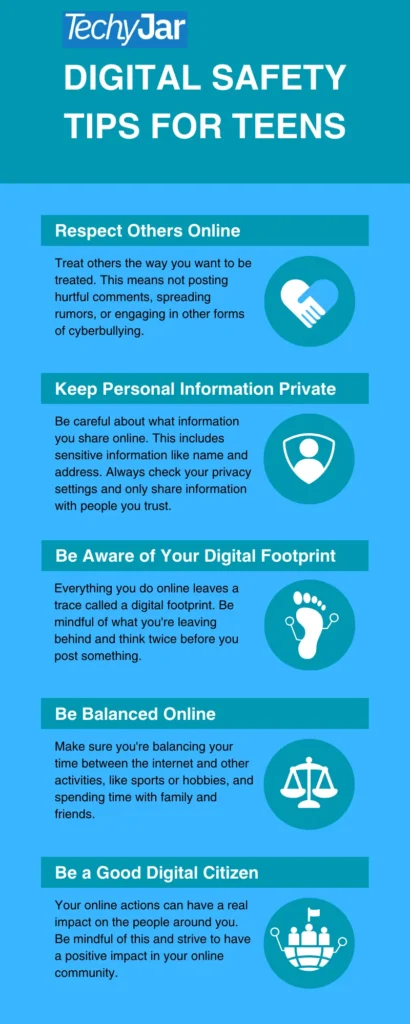
A digital footprint is everything that exists about a person online: posts, photos, comments, likes, gaming profiles and what others share about them. Students rarely think about it, but colleges, scholarship committees and employers increasingly look people up online.
- Search your own name regularly and see what appears.
- Keep accounts private and review old posts.
- Ask friends before posting photos of them, and expect the same respect.
- Remember that deleted content may still exist in screenshots or archives.
- Build a positive footprint: share projects, achievements, volunteering and creative work.
A helpful question for teens: ‘Would I be comfortable if a teacher, grandparent or future employer saw this?’ If not, do not post it.
Misinformation and media literacy
Students see huge amounts of information online, much of it unverified. AI-generated images, videos and text have made fakes easier to create and harder to spot. Media literacy helps students judge what to trust.
- Check the source: who published this, and are they reliable?
- Look for evidence: are claims backed by data or other credible sources?
- Read beyond the headline: headlines are often written to provoke a reaction.
- Check the date: old stories are often recirculated as new.
- Reverse image search photos to see where they really came from.
- Notice emotions: content designed to make you angry or afraid is more likely to be misleading.
- Pause before sharing anything you have not checked.
A note for parents on ‘sharenting’
Children’s digital footprints often start before they can type, with photos and stories posted by proud parents. That is natural, but it is worth thinking about privacy and safety:
- Avoid posting details that reveal your child’s school, address or daily routine.
- Turn off location data on photos.
- Keep accounts private and limit audiences.
- Ask older children for permission before posting about them.
- Think about whether a post could embarrass them in the future.
Setting up a student’s device safely
Before handing over a new phone, tablet or laptop, a few minutes of setup makes a big difference:
- Create a child account linked to a parent account (Apple Family Sharing or Google Family Link).
- Set content restrictions appropriate for their age.
- Require approval for app downloads and purchases.
- Set downtime and app limits, especially overnight.
- Turn on SafeSearch and YouTube Restricted Mode for younger children.
- Turn off location sharing except with family.
- Install security software on laptops; see our best antivirus guide.
- Agree a written family tech agreement and review it together every few months.
Creating a family technology agreement
A written family agreement makes expectations clear and gives children a say in the rules. Review it every few months as children grow. A good agreement covers:
- When and where devices can be used, including device-free times and places.
- Which apps and games are allowed, and how new ones are approved.
- Privacy rules, such as never sharing passwords, location or personal details.
- Kindness online, including how to treat others and what to do if you see bullying.
- Spending rules for apps and games.
- What happens if something goes wrong, with a promise that telling an adult will not automatically lead to punishment.
- Parents’ commitments too, such as putting phones away at meals and asking before posting photos of children.
Teacher-centric cybersafety resources
- Common Sense Education: free, research-based digital citizenship curriculum for kindergarten to grade 12, with lesson plans, videos and family activities.
- NetSmartz (National Center for Missing and Exploited Children): age-appropriate videos, presentations and activities on online safety.
- StopBullying.gov: federal guidance for preventing and responding to bullying and cyberbullying.
- FBI Safe Online Surfing: free, game-based online safety lessons for grades 3 to 8.
- Be Internet Awesome (Google): a free curriculum and game for younger students.
- iKeepSafe and the Cyberbullying Research Center: research and resources for educators.
- ConnectSafely: parent and educator guides to popular apps and platforms.
Lesson ideas
- Spot the fake: compare real and fake news headlines or accounts and discuss the clues.
- Privacy detectives: review a fictional profile and identify what personal details are exposed.
- Kindness challenge: students write positive comments for classmates’ work.
- Password power: create strong passphrases and discuss why reuse is risky.
- Digital footprint timeline: imagine how a post might be seen in five years.
What a good school online safety policy includes
- A clear acceptable use policy for school devices and networks, signed by students and parents.
- Rules for personal devices, including phones, during the school day.
- Filtering and monitoring that meets legal requirements such as CIPA, reviewed regularly so it does not block legitimate learning.
- A digital citizenship curriculum for every grade.
- Clear procedures for reporting and responding to cyberbullying, sextortion and image abuse.
- A named safeguarding or online safety lead.
- Staff training on online risks and professional boundaries when communicating with students.
- Regular communication and workshops for parents.
Supporting students with additional needs
Students with special educational needs or disabilities can benefit hugely from technology, but some may find it harder to recognize manipulation, understand social cues online or judge risk. Extra support helps:
- Use clear, concrete rules and visual reminders.
- Practice scenarios through role play.
- Agree a simple ‘stop and tell’ rule for anything confusing.
- Use stronger controls on contacts and messaging.
- Coordinate between home and school so rules are consistent.
Internet safety guide for teachers and parents
The best results come when families and schools work together and give students consistent messages.
For teachers
- Build online safety into regular lessons, not just a one-off assembly.
- Model safe and respectful technology use.
- Know your school’s reporting procedures and safeguarding lead.
- Watch for changes in students’ behavior that could signal online problems.
- Share key messages and resources with parents.
For parents
- Learn the apps and games your child uses; try them yourself.
- Keep devices out of bedrooms overnight.
- Use controls as support, and explain why.
- Stay in touch with the school about policies and concerns.
- Keep talking, especially when things are going well.
For communities
- Libraries, youth clubs and faith groups can host family internet safety workshops.
- Coaches and youth leaders should follow safeguarding rules for messaging young people.
- Community leaders can share warnings about local scams and trends.

Frequently asked questions
What are the biggest online risks for students?
Cyberbullying, scams and phishing, inappropriate content, contact with predators, sextortion, privacy leaks and unhealthy screen habits.
How can teachers teach internet safety?
Use short, regular digital citizenship lessons, discuss real scenarios, and set clear classroom device rules. Free curricula from Common Sense Education, NetSmartz and Google’s Be Internet Awesome help.
Should I monitor my child’s phone?
Age-appropriate supervision is reasonable, especially for younger children. Be open about it, and focus on alerts for real risks rather than reading everything. See our guide to the best parental control apps.
At what age should a child get a smartphone?
There is no single right age. Consider maturity, need and whether you can set up controls and rules. Many families start with a basic phone or a smartwatch and move to a smartphone later.
What should my child do if they see something upsetting online?
Close it, tell a trusted adult and report it on the platform. Make sure they know they will not be in trouble for telling you.
How do I report online child exploitation?
Report it to the NCMEC CyberTipline at report.cybertip.org or 1-800-843-5678, and to local police. Do not save or share explicit images of minors yourself.
Are parental controls enough to keep students safe?
No tool catches everything. Controls are most effective combined with education, clear rules and open conversations.
How can schools tell parents about online safety?
Short newsletters, parent workshops, guides to popular apps and sharing the school’s own policies all help families reinforce the same messages at home.
Is it safe for students to use AI chatbots?
They can be useful for learning, but students should check facts, follow school rules on AI use and never share personal information with a chatbot.
Final thoughts
Keeping students safe online works best as a partnership between families, schools, communities and the students themselves. Teach the skills, set clear and fair rules, use tools wisely and keep the conversation open so young people always feel able to ask for help. A confident, informed student is the best protection there is.